 0 800 335 278
What is a conversion
 10.12.2024
Tenders and partnerships
team@comon.agencySales department
sales@comon.agency


You’ve created a website or social media page. You’ve invested time, money, and inspiration, created a design, added wow texts, and a big “Buy Now” sign. People come in, look at it, move the mouse… and leave. What’s the problem? The problem is conversion. This is what determines how many visitors turn into buyers, subscribers, or clients. In other words, if people come to your website but do nothing, there is no conversion. But if they leave a request or make a purchase, it is.
Conversion is when a visitor stops being just a “guest” and becomes a client, buyer, or at least a subscriber.
Imagine that you invite your friends to visit. One comes empty-handed, eats all the cookies and leaves. The other one brought a cake, complimented you, and helped you wash the dishes. So, conversion is the second case. Because there is a benefit. In this article, we’re going to figure out what a conversion is and how to make your website or page “sell.”

So, conversion is the percentage of people who visited the site and did what you wanted them to do (buy, register, subscribe) to the total number of people who just came to “look”. That is, when a “site visitor” turned into a “useful site visitor”.
Formula:
Conversion (%) = (Number of targeted actions / Number of visitors) × 100
For example, if 100 people came to your store and 3 of them bought “socks made of sheep’s wool,” the conversion rate is 3%.
Examples of conversions in different industries
E-commerce:
Educational platforms:
Media sites:
Service websites:
Let’s say you own a coffee shop. You have 100 people come in every day, but only 10 of them buy coffee. These 10 people are your conversion rate. On the Internet, it’s the same, but instead of coffee, they buy goods, services, or subscriptions.
The main types of conversions: Macro and Micro
Macro conversions are the ultimate goal for which everything was started. Macro conversions are the ones that bring profit. And micro conversions are small, they don’t bring in money right away, but without them, it’s impossible to achieve the main goal.
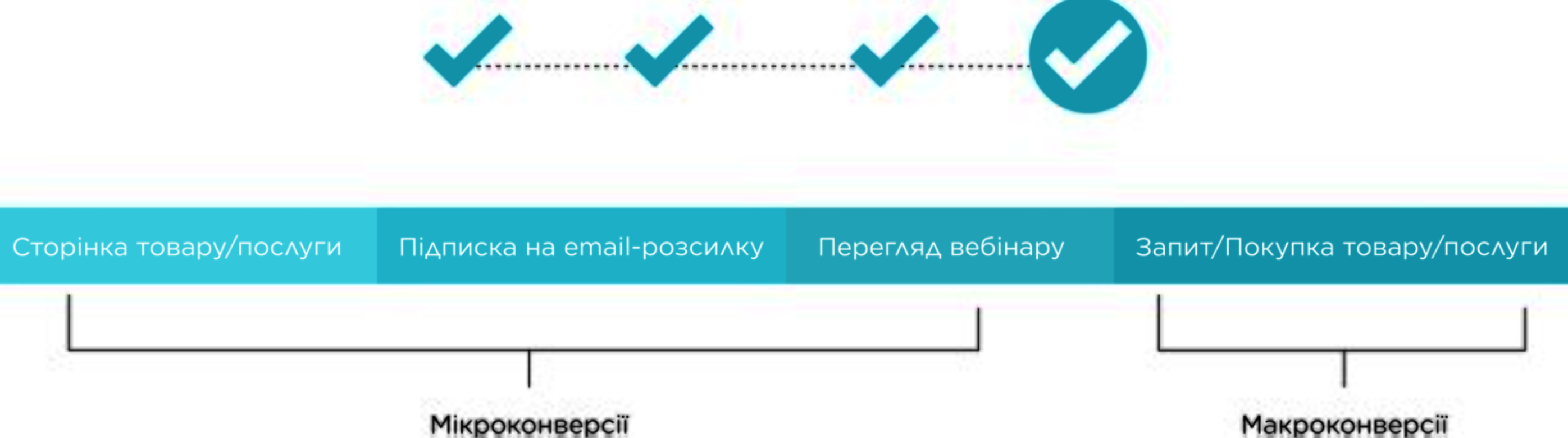
Macro conversions for an online store are the purchase of goods, for an online course – payment for a subscription. Micro conversions are registering on the site, adding an item to the cart (but not yet paying), subscribing to a newsletter, etc.
How it looks like in practice:
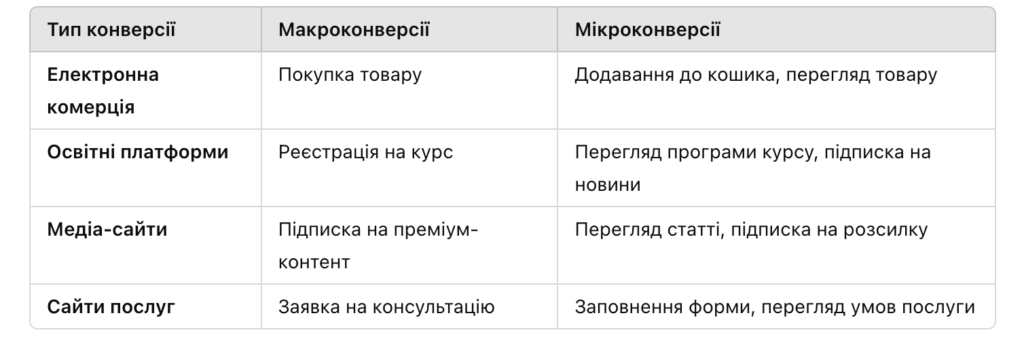
Primary and secondary conversions
Primary (macro) conversions are the main goal. Money, a check, a virtual “ding” in your wallet.
Secondary (micro) conversions are small actions that lead to a big goal. Like a “good morning” from a barista in a coffee shop – nice, but not yet coffee.
How to analyze conversions in different marketing channels?
Social media
Everyone watches stories, but only the best ones are liked. Your task is to make sure that people run to buy after the story. There are tools for this:
Facebook Insights – who watched your content, when and why.
Instagram Analytics – how many times your post was scrolled through (which means you missed the mark with the topic).
What to track?
Email newsletters
Emails are a way to remind customers about promotions.
What to track?
Advertising
This is here to help us:
What to track?
The sales funnel is the customer’s route from “Oh, I’m interested!” to “I’ll take it, give me two!”. Each step is a stage of the funnel: from product awareness to the order itself. And conversion is those who have passed to the next stage.
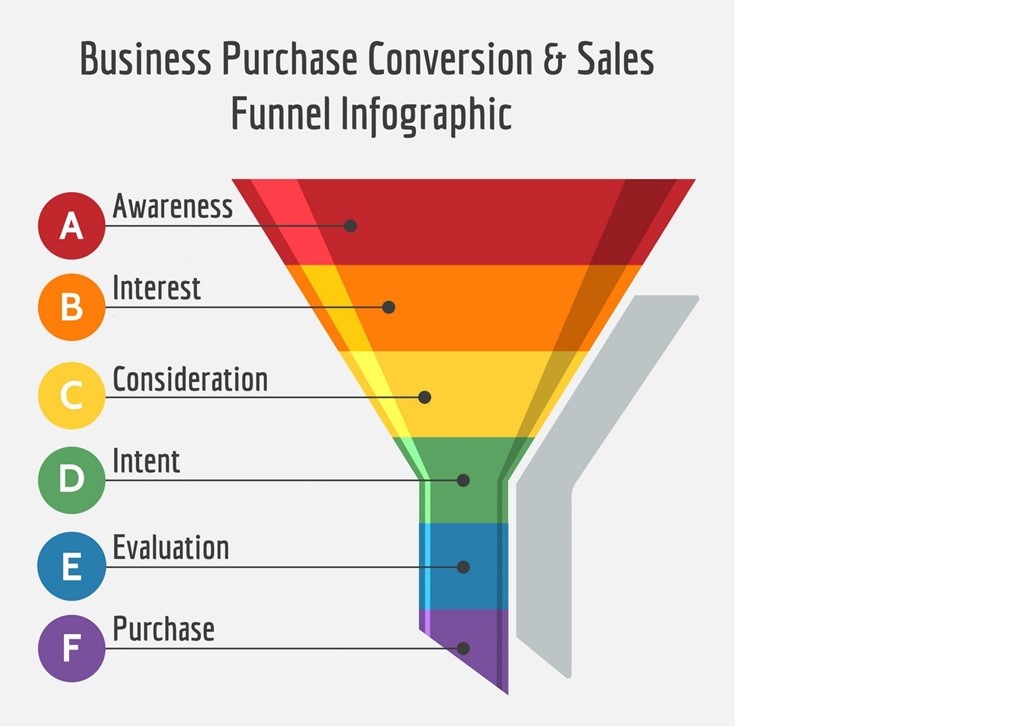
A conversion in the sales funnel is when a customer doesn’t just pass by, but takes an action that interests us. He saw an ad and visited the website. They visit the site and add something to the cart. Added to the cart – paid. Each of these stages has its own conversion rate. And if the customer went through all the stages and didn’t buy, it means that you either didn’t convince him or your competitors did a better job.
The funnel has five main stages. Each of them has its own mission – and its own customer losses.
At each of these stages, the conversion rate shows how many customers moved on:
The higher the conversion rate at each stage, the more money the business has.
This is an ideal scenario where every step is automated.
The conversion formula is simple:
Conversion rate (%) = (Number of people who moved to the next stage / Number of people who were at the previous stage) × 100
For example, 1000 people came across an ad. Of these, 200 went to the website. Conversion rate = (200 / 1000) × 100 = 20%. Everything is as clear as a microwave instruction manual.
Calculation example: an online store and 100 visitors
During the day, 100 people visited the site, 10 of them clicked the “Buy” button. We calculate by the formula:
(10100)×100%=10%\left( \frac{10}{100} \right) \times 100\% = 10\%
So, one tenth of the customers made a purchase. For an online store, this is very cool, by the way, because the average market figure is about 2-3%.
Calculating the conversion rate is only half the battle. It is also important to understand what these numbers mean. Because when you see 2%, your brain starts looking for someone to blame: “Is this good or bad?”, ‘Isn’t it time to fire the advertising manager?’. So:
The average conversion rate for online stores is 2.35%.
In some niches (for example, selling courses or services), the conversion rate can reach 10% or more.
If you have a 2% conversion rate and you work in online retail, this is normal.
2. Where are visitors lost?
Conversion rate is a signal to action. If you have 0.5%, look for weaknesses. Where exactly do people “disappear”? At the cart stage? Can’t find the “buy” button?
3. Test it.
Change button colors, add emotional appeals (“2 products left!”), test headline options. For example, replacing “Buy now” with “Get it right now” can add +2% to conversion (and sometimes subtract, so test it).
4. Consider seasonality
Black Friday, the New Year’s boom, and the wedding season are the periods when the coefficient can grow strongly. It is important to know these periods and take them into account when planning campaigns.
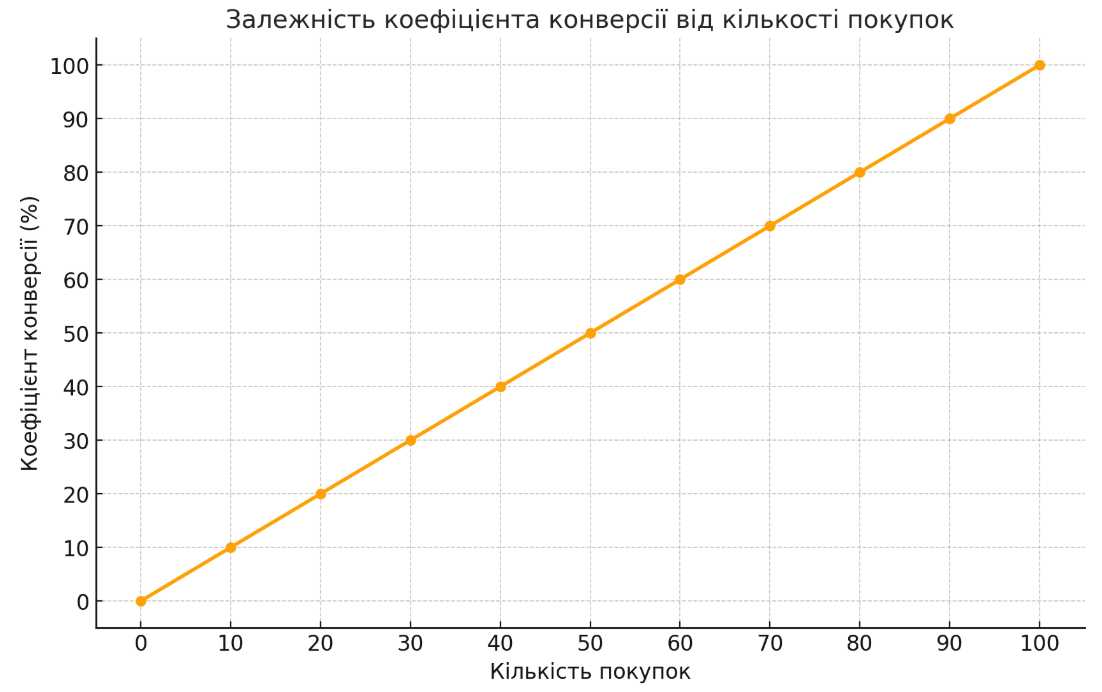
If you have a website, each visitor costs money. You’re not luring them in off the street, but through advertising, targeting, SEO, and marketers’ “tambourine dancing.” So you have to pay for each click. For example, you spent 10,000 UAH on advertising and attracted 1,000 visitors. Conversion rate = 1%. This is 10 sales. That is, each purchase cost you 1000 UAH. Now imagine that you didn’t increase the number of visitors, but simply “pumped up” the conversion rate to 2%. Out of the same 1000 visitors, you have already received 20 purchases. The costs are the same, but now each purchase cost 500 UAH.

Personalization of products
Amazon has long known that if you show a person “Recommended for you,” they will think: “Wow, how do they know what I need?”. For example, you’re looking at laptops and you’re offered a mouse, a stand, and a protective film. As a result, you buy everything, even though you were only planning to buy a laptop. The conversion rate increases by 10-30%.
Customer feedback and social proof
You visit flowers.ua and see: “This bouquet has just been ordered by Nikolai from Kyiv.” You pay attention to it and, if you like it, buy it too. This is the power of social proof. Why do websites have a block “We are trusted by 500,000 customers”? Because we trust the crowd more than our own instincts.
Change the CTA button
According to statistics, the phrase “Buy” converts worse than “Get it now”. People like “get” better because it seems to be free.

The topic of conversion is like talking about a healthy lifestyle. Everyone has heard that it is important, but no one wants to do it until they see a mirror with an unexpected reflection. It’s the same with websites: until analytics show zero sales, no one will even think to change anything. So how do you make your website so that people stay, take interest, and buy? Let’s look at four methods that will help.
UX/UI is not just a beautiful website cover, but something that makes users feel like they are in a comfortable chair with a cup of cappuccino. A simple example: you visit a website and it takes 5 seconds to load. In the modern world, it’s like waiting for a bus in the rain.
What to do:
Take two versions of the page: one has a red button, the other a green one. See which one brings in more orders.
What to test:
Personalized offers
Why does Netflix know that you like dramas, but your website still shows the same banner to everyone? Research customer behavior and offer them content tailored to their interests. People like to be remembered.
Targeted advertising is when an ad comes to the right person and says: “Here, just for you, dear.”
What do we do?
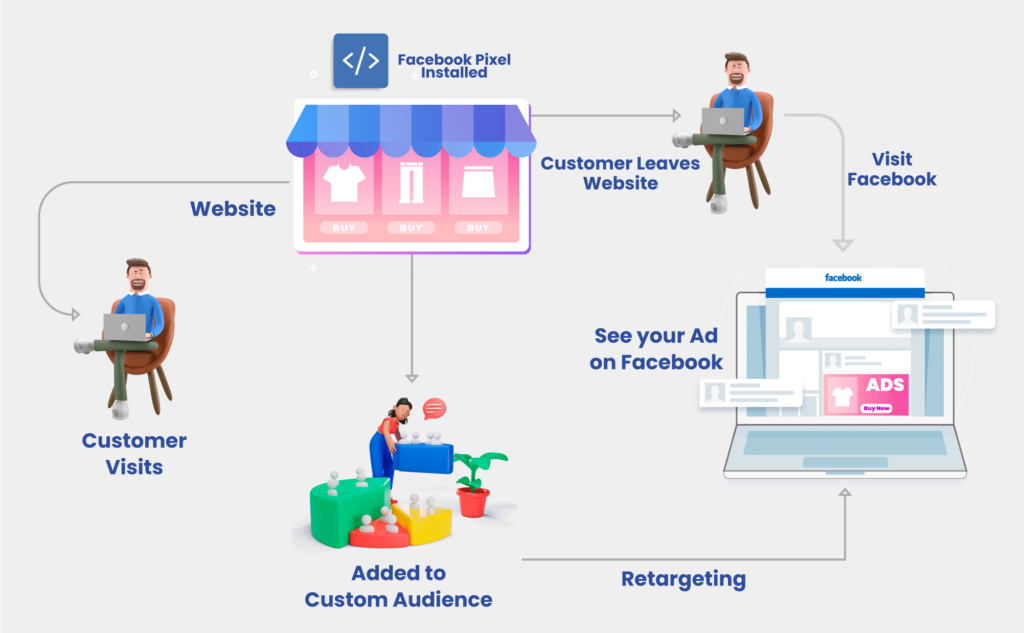
How retargeting works:
Landing Pages are the pages where people go after clicking on an ad. And here it is important to impress at first sight, like a first date. To do this, your page should speak directly: “Buy now!” Remove all unnecessary information: the more text, the more doubts. Also, use videos or animations that attract attention.
What should be in a CTA:
If Google Analytics were a person, it would definitely wear glasses and speak only in numbers. But those numbers can change your life. What it does:
Do you know the feeling when you’ve just thought about a new sofa and Facebook is already showing you ads for sofas? This is the work of Facebook Pixel. What does it do?
Hotjar is like a surveillance camera for your website users. It doesn’t just record actions – it shows them! What it can do:
Here are four key reports that every marketer needs:
How to interpret the data:
Incorrectly set goals make it difficult to assess performance and make informed decisions. If you don’t set SMART goals (specific, measurable, attainable, relevant, and time-bound), your reports will contain chaotic indicators that are difficult to interpret. And instead of a clear assessment of the results, you will get a bunch of incomprehensible numbers.
Ignoring A/B testing makes it impossible to determine which of the variants of website elements works better. A/B testing allows you to check different variants of buttons, texts, or pages and choose the one that brings more conversions. For example, a designer has decided that the orange button is a trend. But during testing, it turned out that the green one is clicked 2 times more often. Without testing, this information could have been lost.
The absence of a mobile version of your website limits access to your product or service for smartphone users, which is the majority of potential customers. People are accustomed to shopping and browsing on their smartphones, so a mobile version is a necessity, not an option.
The lack of user behavior analysis makes it difficult to increase conversion rates. Without data on how users interact with the site, it is difficult to understand which elements work effectively and which do not.
How to set up analytics to make everything work as it should?
To work effectively with analytics, use modern tools such as Google Analytics 4. This platform allows you to track events and set goals to better understand user actions. Events are any interactions with your website, such as button clicks, page views, or form completions. Tracking such events allows you to get detailed information about visitor behavior and improve website performance.
Focus on tracking important actions that have a real impact on conversion. There is no point in recording all user actions, it is better to focus on key events: filling out forms, making purchases, viewing specific products. Set up these actions as goals in your analytics system, which will allow you to quickly determine which changes in your strategy really bring results.
Use heatmaps and session recordings to understand how users interact with your site. This helps to identify problem areas, such as inconvenient button placement or difficult to understand elements. Thanks to these tools, you can remove barriers to conversion and make your site more user-friendly.
Marketing is not a finished novel, it’s an endless series. Every time there are new episodes, new characters, and new twists and turns. If you don’t update your strategy, you risk becoming the hero of a series that viewers have long since “scrolled through.”
Conversion is a key website performance indicator that determines how many visitors turn into customers. To increase conversion, it is important to simplify navigation, optimize website speed, conduct A/B testing, and add reviews and personalized offers. And tools like Google Analytics and Hotjar will help you see problem areas on the customer journey.
Think about how efficiently your website works. How many steps does it take to buy a product? Is it easy for users to find the “Buy” button? If something is in doubt, it’s time to optimize the process.
And if you don’t have enough time or experience, contact Digital Marketing Agency Comon Agency – our experts will help you set up tools that will turn visitors into customers and increase your profits.

 05.04.2024
